Takeoff Performance Calculator
The Takeoff Performance application computes precise departure performance figures, optimal thrust settings, and reference takeoff speeds.
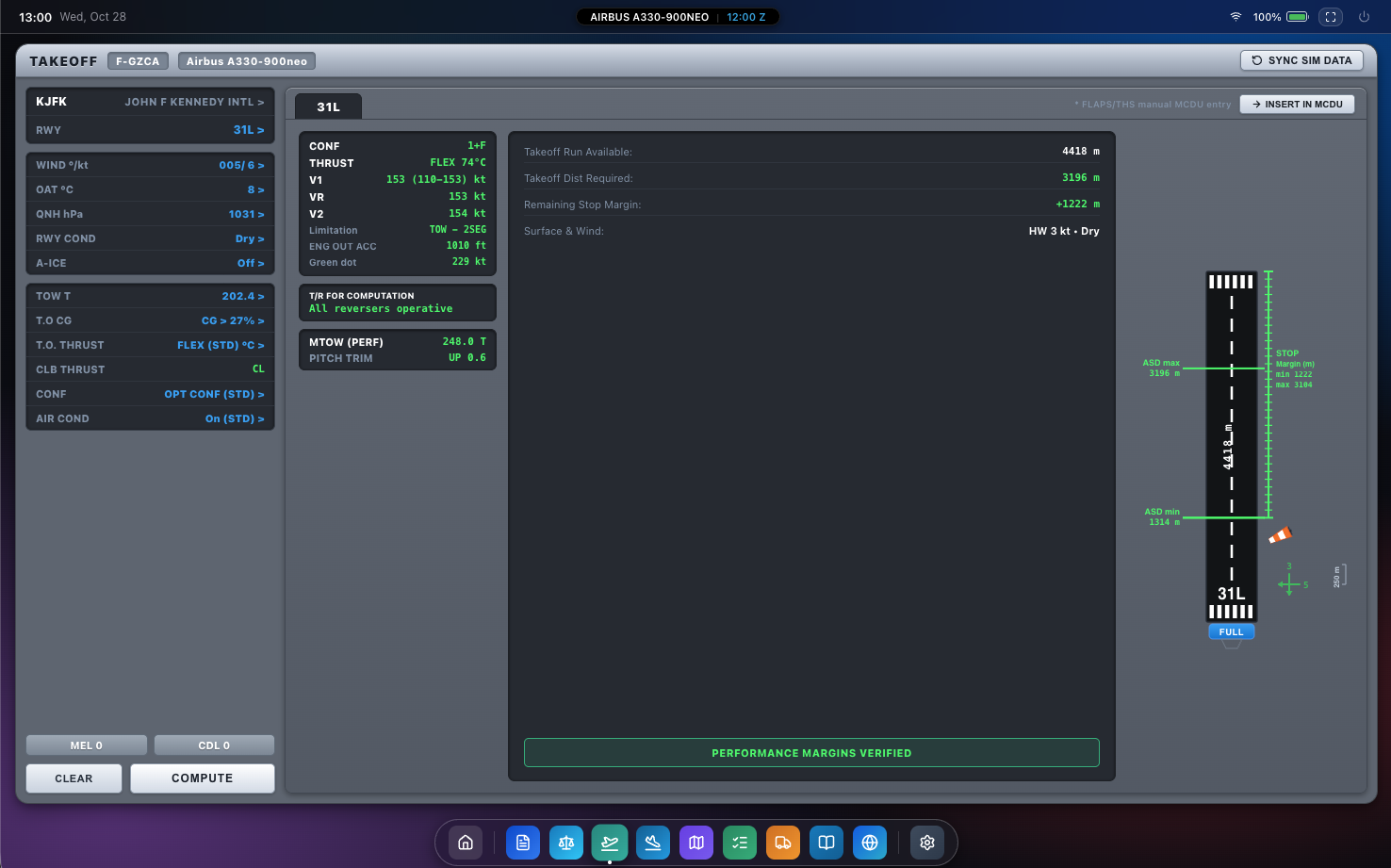
Takeoff Calculation Workflow
- Airport & Runway Selection: Enter the 4-letter ICAO code for your departure aerodrome. Select the active runway or designated intersection departure. Available runway lengths (TORA, TODA, ASDA) and elevation update automatically.
- Atmospheric Conditions: Verify surface wind direction/speed, outside air temperature (OAT), and barometric altimeter setting (in hPa or inHg).
- Aircraft Configuration: Confirm takeoff gross weight (in Tonnes or 1000 lbs), air conditioning packs status (ON/OFF), anti-ice configuration (ENG or ENG+WING), and desired flap setting.
- Compute Performance: Tap Compute to execute the calculation.
- Review Results:
- Assumed / FLEX Temperature: Maximum permissible thrust reduction temperature.
- V-Speeds: Decision speed ($V_1$), Rotation speed ($V_R$), and Engine-out safety speed ($V_2$).
- Trim & Speeds: Recommended pitch trim (THS) and clean climb speed (Green Dot).
- Runway Margins: Required takeoff roll distance and stop margin remaining.
- MCDU / FMGS Insertion: Tap Insert in MCDU to transfer computed V-speeds and FLEX temperature directly into the aircraft FMGS scratchpad on supported aircraft.
[!NOTE] Due to aircraft FMGS dataref limitations, the takeoff flap and pitch trim setting (FLAPS/THS, e.g.
1/UP0.5) cannot be inserted automatically via datarefs. Enter this figure manually into line select key 3R on the MCDU PERF TAKEOFF page.